


Modern mobile apps handle sensitive user data, authentication tokens, payment flows, and personal information. If you’re building a React Native app that interacts with a backend, you’re already operating in an environment where attackers actively analyse mobile applications for weaknesses.
Here’s the uncomfortable truth:
Most mobile apps ship with minimal real security protections.
Attackers know this. And they take advantage of it.
In this guide, we’ll explore the real security risks React Native apps face and the layered defenses you can implement to protect both your users and your backend systems.
Why Mobile App Security Matters
A compromised mobile app exposes both the user and the backend infrastructure behind it. Attackers commonly target mobile apps to:
- Extract API endpoints
- Automate backend requests
- Bypass authentication flows
- Intercept network traffic
- Reverse engineer business logic
- Steal credentials and tokens
The moment your mobile app communicates with a backend API, it becomes a potential attack surface. For apps dealing with payments, healthcare data, financial accounts, or identity verification, the consequences can be severe:
- Financial fraud
- Data leaks
- Regulatory violations
- Mass account creation attacks
- Long-term reputation damage
Security isn’t just about protecting the mobile application itself.
It’s about protecting the entire system behind it.
What Makes React Native Apps Vulnerable
React Native apps have several architectural characteristics that attackers often exploit.
Rooted and Jailbroken Devices
On rooted Android devices or jailbroken iPhones, the operating system’s security model can be bypassed. This allows attackers to:
- Access private app storage
- Inspect memory
- Hook runtime functions
- Intercept network traffic
- Extract sensitive tokens
Once a device is compromised at the OS level, many assumptions about application security no longer hold.
APIs Exposed to the Internet
Your mobile application is simply a client for your backend APIs. Those APIs are accessible from anywhere on the internet. If an attacker extracts your API endpoints from the app bundle, they can call them directly without using your mobile app at all. This enables attacks such as:
- Automated account creation
- Credential stuffing
- API scraping
- Bot-driven abuse of backend services
Without server-side verification, your backend has no way to distinguish between a legitimate app request and a scripted attack.
Debug Builds Accidentally Shipped
Another surprisingly common issue is shipping production apps with debug configurations enabled. Debug builds can expose:
- Internal logging
- Debugging endpoints
- Disabled security protections
- Developer tools
While this may seem unlikely, it happens more often than most teams expect.
Understanding the React Native Attack Surface
Every mobile app contains multiple components that attackers can target.
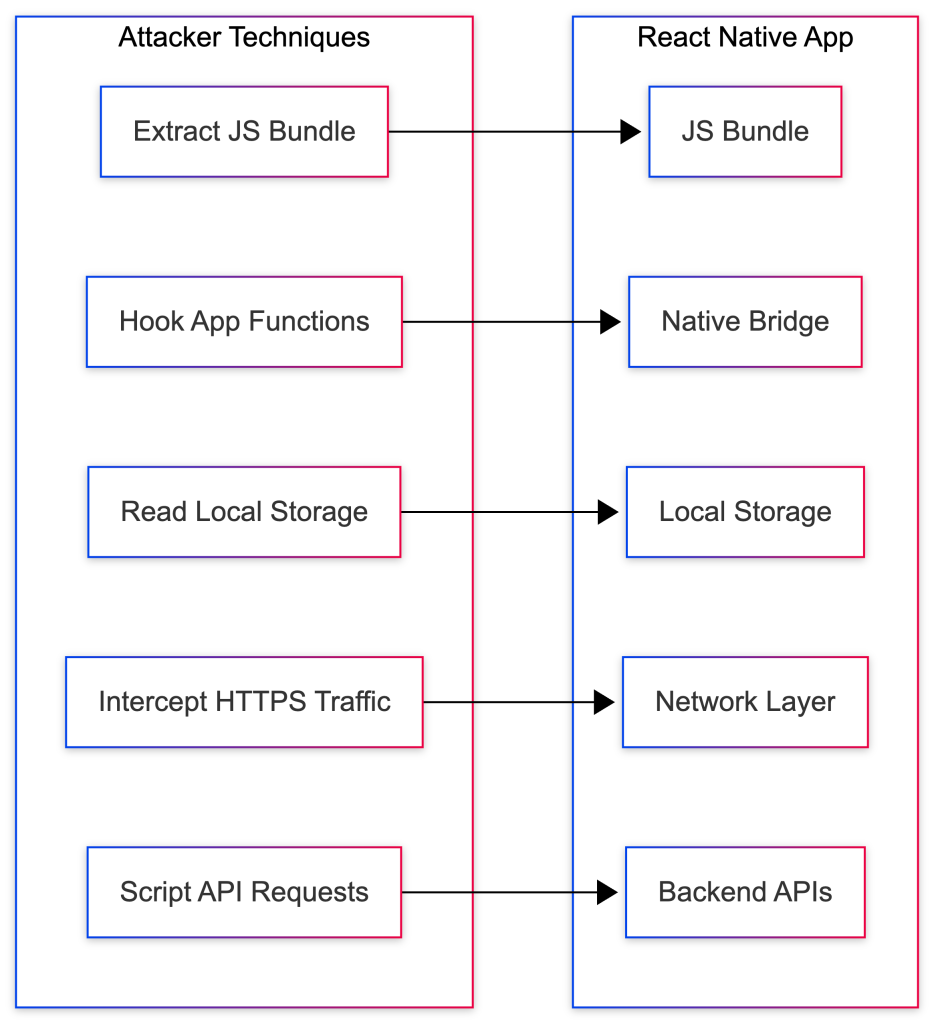
Each attack targets a different part of the application. Which means protecting a mobile app requires multiple defensive layers.
The Layered Security Model
No single library can secure a mobile application. Effective mobile security follows a defense-in-depth strategy, where multiple protections work together to reduce risk.
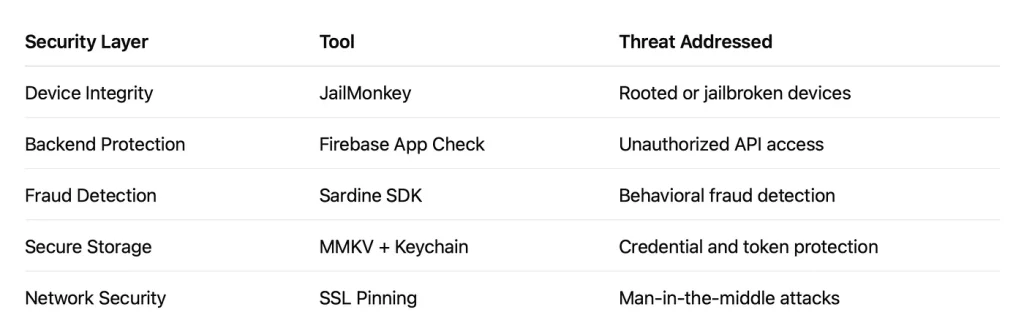
Together, these layers dramatically increase the effort required to compromise your system.
The Five Security Questions Every Mobile App Must Answer
A secure mobile architecture answers five critical trust questions.
1. Can I trust what is stored on this device?
Sensitive data must be protected using encrypted storage and hardware-backed secure enclaves. Tools: Encrypted MMKV, Keychain, Biometrics
2. Can I trust this device?
Compromised devices can bypass operating system protections. Tool: JailMonkey
3. Can I trust this network connection?
Attackers may install custom certificates and intercept HTTPS traffic. Tools: SSL Pinning, Payload Encryption
4. Can I trust this request came from my app?
Your backend must verify that incoming requests originate from a legitimate application instance. Tool: Firebase App Check
5. Can I trust this user’s behaviour?
Even legitimate applications can be used by fraudsters or automated bots. Tool: Sardine SDK (for fintech applications)
Security Architecture Overview
A well-designed mobile security architecture looks something like this:
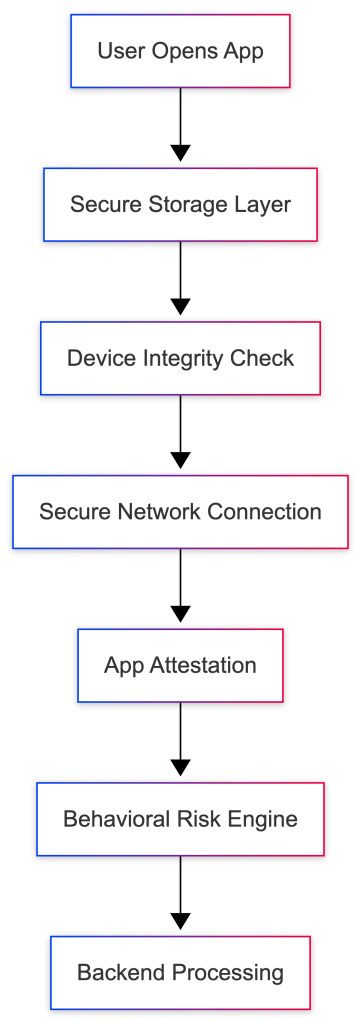
Each stage acts as a filter before requests reach the backend.
What We’ll Cover in This Series
In the upcoming articles, we will walk through how to implement each security layer in a production React Native application.
Part 2 — Protecting Your App from Rooted and Jailbroken Devices
Part 3 — Runtime Protection from Hooking and Tampering
Part 4 — Protecting APIs with App Attestation (Firebase App Check)
Part 5 — Securing Sensitive Data & Biometric Gates
Part 6 — Preventing MITM Attacks and Payload Encryption
Final Thoughts
Mobile security is rarely implemented all at once. Most teams gradually add protections as their applications grow. The important part is starting early.
Attackers do not wait until your app becomes popular. They begin the moment your APIs become publicly reachable.
If your React Native app handles authentication, financial transactions, or personal data, a layered security architecture is no longer optional.
It’s the baseline.