


Introduction
When we think about a chatbot, the first thing that usually comes to mind is asking a question and getting an answer. But in many business situations, answering the question is only half of the job. Users may also expect the system to create a ticket, check some information, start a workflow, or update another application.
This is where I find Microsoft Copilot Studio particularly interesting.
It provides a low-code way to create agents that can work with both conversations and business processes. For example, an agent can search information stored in company documents, respond to the user, and then call a workflow or connected system if some action needs to be performed.
This makes the experience quite different from building a chatbot that only follows a fixed question-and-answer flow. Depending on the request, a Copilot Studio agent can work with knowledge sources, use available tools, and decide what should happen next in the conversation.
To understand this better, let’s look at the main building blocks of Copilot Studio and see how they can be used in practical business scenarios.
What Is an AI Agent in Copilot Studio?
A simple way to understand an AI agent is to compare it with a normal chatbot.
Suppose an employee asks a common HR question:
User: What is our leave policy?
Chatbot: Finds the relevant leave policy information and provides the answer.
In this case, retrieving the information is enough.
An AI agent can go further.
User: Apply for leave next Monday.
The agent can:
- Understand the request.
- Ask for missing information if required.
- Check the employee’s leave details.
- Call a workflow or business system.
- Create the leave request.
- Return the final status to the employee.
The following diagram shows how this leave-request example can work end to end in Copilot Studio.
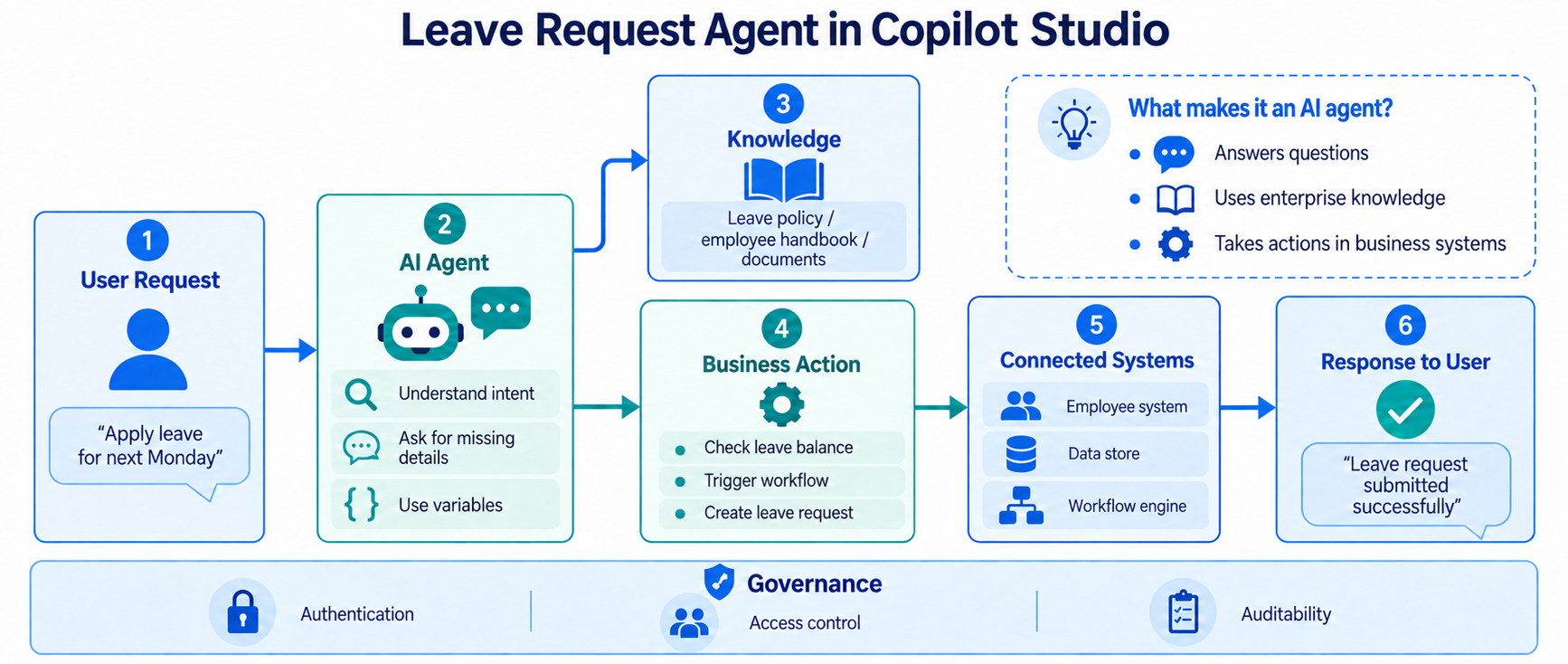
Original illustration showing an example leave request agent workflow in Copilot Studio.
This ability to combine reasoning, knowledge, and actions is what makes modern Copilot Studio agents more powerful than simple FAQ bots.
Core Components of Copilot Studio
Instructions
Instructions define the agent’s purpose and expected behavior.
For example, an IT support agent might receive instructions such as:
Help employees resolve IT issues, search approved support documents, collect required details, and create a support ticket when an issue cannot be resolved.
Clear instructions help the agent understand what it should and should not do.
Knowledge
Knowledge gives an agent access to information that it can use when answering questions.
Copilot Studio supports knowledge sources such as:
- SharePoint
- Uploaded documents
- Public websites
- Microsoft Dataverse
- Azure AI Search
- Enterprise data sources and connectors
For example, an HR agent could use company policy documents stored in SharePoint to answer questions about leave, travel, or benefits.
Instead of relying only on the model’s general knowledge, grounding the agent with approved enterprise information can make its responses more relevant to the organization.
Topics
Topics are useful when we want more controlled conversational logic.
A topic can contain steps such as:
- Ask a question
- Store the user’s response
- Apply conditions
- Display a message
- Call a tool
- Redirect to another topic
Consider an IT helpdesk scenario:
User selects Hardware Issue
→ Agent asks for the device type
→ Agent asks for severity
→ Agent collects contact details
→ Agent creates a ticket
→ Agent returns the ticket number
Topics are especially useful when a process needs predictable business rules.
Entities and Variables
Entities help identify important information from a user’s message.
For example:
My ticket number is INC-12345.
The agent can identify INC-12345 as a ticket number.
Variables are then used to store information collected during the conversation, such as:
- Employee name
- Ticket ID
- Priority
- Email address
- Selected service
- Location
These values can later be passed to topics, tools, Dataverse, APIs, or workflows.
The individual components become easier to understand when we see how they work together. The following diagram shows a high-level agent architecture, from the user request through orchestration, knowledge, tools, workflows, and connected business systems.
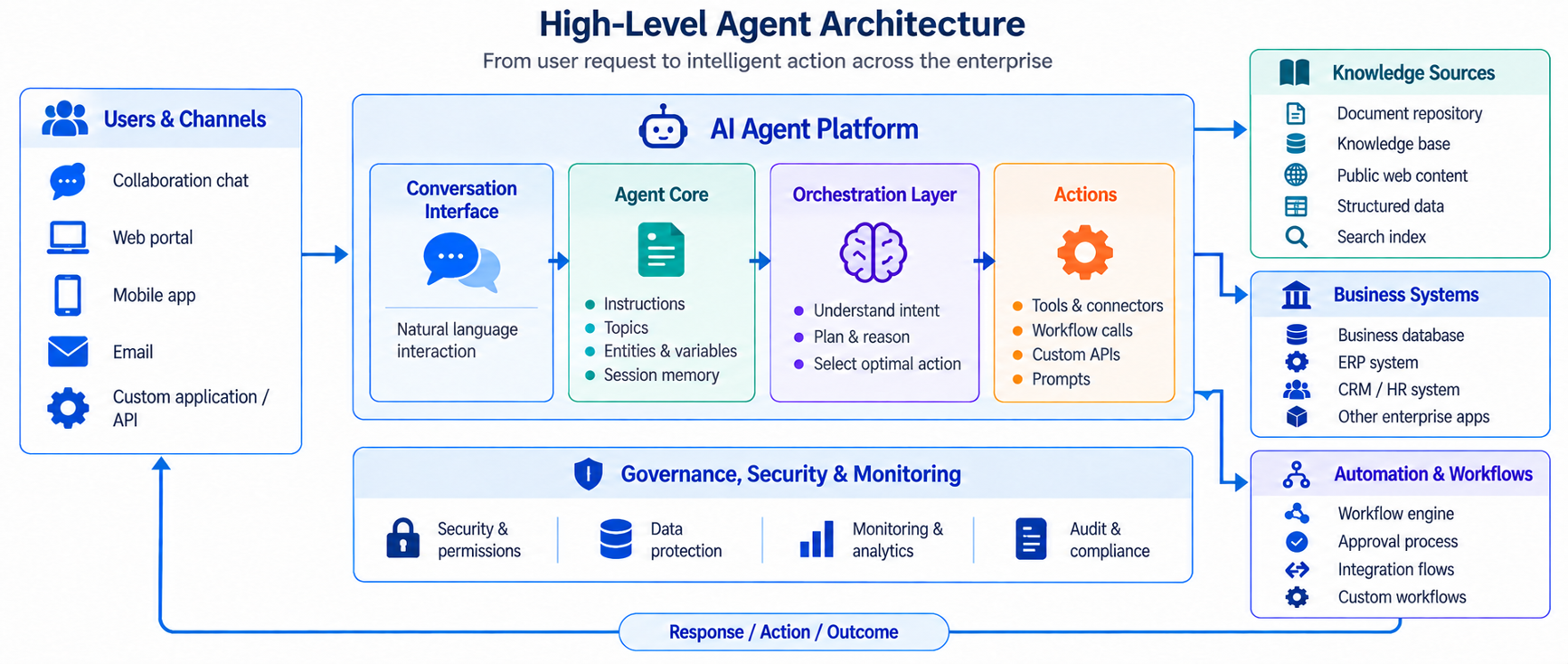
Original illustration showing a high-level architecture for an enterprise AI agent.
Generative Orchestration
One of the most important capabilities in modern Copilot Studio is generative orchestration.
Instead of depending only on predefined trigger phrases and fixed paths, an LLM-driven orchestration layer can interpret the user’s goal and determine which available components should be used. It can choose among topics, tools, knowledge sources, and connected agents and combine them to complete more complex requests.
A simplified flow looks like this:
User Request
↓
Copilot Studio Agent
↓
Understand Intent and Plan
↓
Knowledge + Topics + Tools + Other Agents
↓
Generate Response or Complete Action
For example:
- Find our work-from-home policy and submit a request for Friday.
The agent may first search the policy knowledge source and then use a tool or workflow to submit the actual request.
Microsoft describes generative orchestration as an LLM-driven planning layer that can select and combine available components rather than depending entirely on manually scripted conversations.
Tools and Connectors
Knowledge helps an agent know something.
Tools help an agent do something.
A tool might allow an agent to:
- Create a support ticket
- Send an email
- Update a Dataverse record
- Retrieve data from an API
- Start an approval process
- Interact with another enterprise application
Copilot Studio can integrate with business systems through Power Platform connectors, agent flows, APIs, prompts, and other supported tools.
This makes it possible to move from a question-answering assistant to a task-performing business agent.
Agent Flows and Automation
Agent flows can be used to execute deterministic business processes.
For example:
User: Create a high-priority laptop support ticket.
The agent could collect the required information and invoke a flow that:
- Creates the ticket.
- Stores it in Dataverse.
- Sends a notification to the support team.
- Returns the ticket ID.
This provides a useful combination:
AI handles understanding and decision-making, while workflows handle controlled business execution.
Autonomous Agents
Agents do not always need to wait for a user to start a conversation.
An autonomous scenario can begin when an event occurs.
Consider customer support:
Incoming Email
↓
Agent analyzes the issue
↓
Determines priority
↓
Creates a support record
↓
Triggers the appropriate process
↓
Sends a response
This pattern is valuable when organizations want AI agents to assist with repetitive operational work rather than only provide chat-based support.
Real-World Use Cases
Copilot Studio can be applied to several enterprise scenarios.
IT Helpdesk Agent
Answers common IT questions, captures incidents, determines severity, and creates tickets.
HR Policy Agent
Answers questions using approved HR policies and can connect employees with HR processes.
Customer Support Agent
Uses product and support knowledge to answer customer queries and trigger backend workflows.
Employee Onboarding Agent
Guides new employees through policies, documentation, access requests, training, and onboarding activities.
Sales Assistant
Retrieves customer information, summarizes account data, and assists sales teams with repetitive tasks.
Testing, Security, and Governance
Building an agent is only the first step.
Before production use, teams should verify:
- Whether answers are grounded in approved knowledge
- Whether tools are called correctly
- What information the agent is able to access and whether any sensitive data could be exposed
- Whether the user has the right permission before an action or data request is completed
- How failed or incomplete conversations will be reviewed later
- What the agent does when a user provides an unexpected or incomplete request
These checks become even more important when the agent is connected to internal business systems. For example, answering a general HR policy question is very different from showing someone’s personal employee information. In such cases, authentication and access control need to be considered as part of the overall agent design.
Conclusion
After looking at these capabilities together, Copilot Studio is easier to see as more than a tool for building conversational bots. It can also be used to build agents that work with information, business logic, and actions across different systems.
There is no single component that does everything. In practice, an agent is built by bringing together instructions, knowledge, topics, generative AI, tools, workflows, and enterprise data, depending on what the use case actually needs.
Knowledge enables the agent to provide relevant information, while tools and workflows allow it to take meaningful actions. Generative orchestration connects these building blocks and helps the agent determine how to respond to more complex requests.
For organizations already using Microsoft 365, Power Platform, SharePoint, Dataverse, or other Microsoft services, Copilot Studio provides a practical low-code path for exploring enterprise AI agents.
The best way to understand the platform is to start with a small use case—such as an IT helpdesk or internal policy agent—connect one trusted knowledge source, add one business action, test it thoroughly, and then expand gradually.